
Subscriptions
HivePBXUpdated 10/15/2026
Scheduling Report Subscriptions
Subscriptions allow you to receive an emailed copy of reports based on filter presets on a set schedule. The Advanced Analytics package is required.
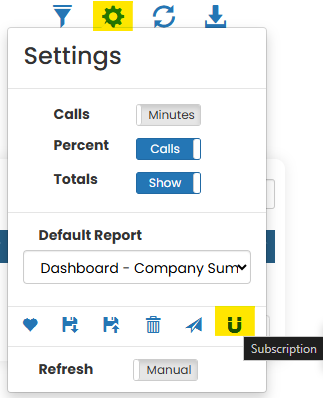
- Open settings and select subscriptions
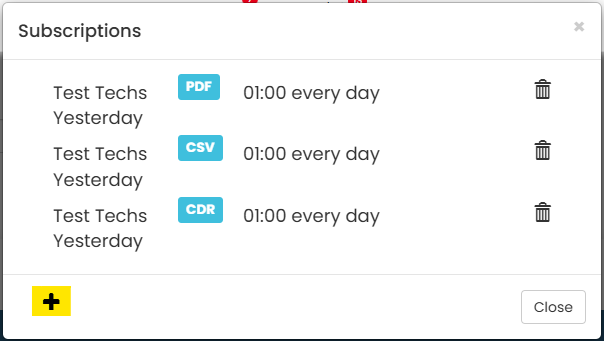
- Click '+' to create a new subscription
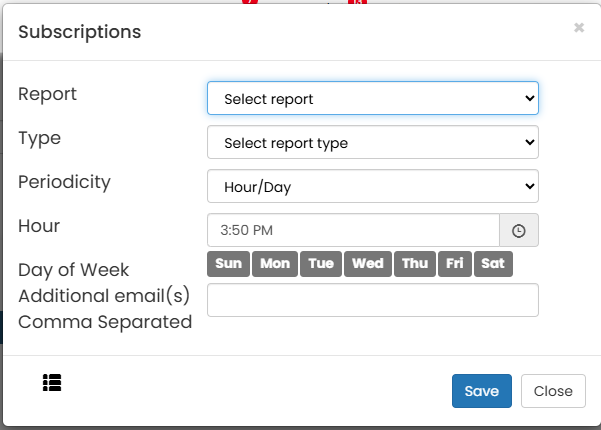
- Choose the filter preset you'd like the report based on
- Choose the format
- PDF (PDF of the report as shown in the portal)
- CSV (comma separated variable file of the CDR logs composing the report)
- CDR (PDF of the CDR logs composing the report)
- Set the type of schedule (periodicity) and the schedule
- Hour/Day - Schedule set by day of week and time of day
- Month - Schedule set by date of month
- Add additional email addresses to which the report will be sent (current user is always a recipient by default)
- Click save
Was this helpful?