
Follow Me
Follow Me allows you to redirect a direct call placed to one of your extensions to another location. You can program the system to ring the extension alone for a certain period of time, then ring some other destination(s), such as a mobile phone or another extension, and then go to the original extension's voicemail other alternate destination if the call is not answered. Follow Me settings are applicable when the extension is called directly (internal extension to extension calls, call transfers going directly to this extension, or when a system feature such as a DID or IVR option directs a call directly to this extension). Follow me will not function if the extension is included in a ring group unless the extension is followed by a # (ex: 100#) in the extension list of that ring group. A large benefit of using follow me to ring an outside number is that by default, it will pass the caller ID of the originating party through to the external number, as opposed to Misc Destinations which will show the trunk CID.
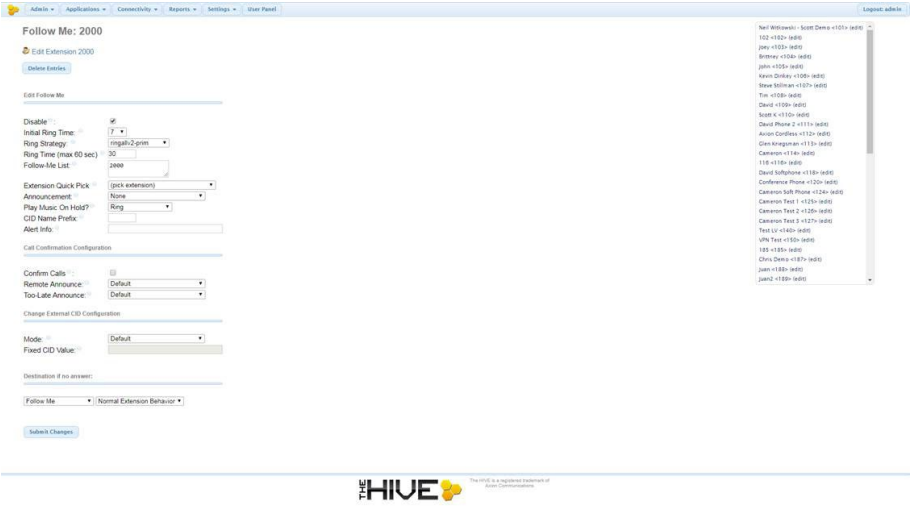
Extension List on right side of screen:
At the Top Right corner of the screen, you'll see a list of the extensions on the system. Clicking one will take you to that extensions follow me settings. You'll see (edit) next to all extensions unless that extensions follow me settings have been "deleted" via the "Delete Entries" option displaying at the top left of the page. Delete Entries is clicked, you'll see (add) listed next to that extension on the list to the right.
Follow Me settings are displays on the left side of the screen
Edit Extensions <ext#>: Link to take you back to the Application > Extension page for the extension you're viewing.
Delete Entries: This button will remove all Follow Me settings on an extension as well as result in (add) displaying next to that extension on the list on the right side of the page
Edit Follow Me
Disable: (Default: checked) When checked, follow me configuration will be ignored on direct call unless the VmX Locator is enabled with the option allowing callers to reach the follow me setting.
Initial Ring Time: (Default: 7) Drop down displaying option 0-60. This will set the amount of time (seconds) that the main extension will ring prior to the Follow-Me List being rung.
Ring Strategy: (Default: ringallv2-prim) Drop down displaying options for how the Follow-Me List will be rung.
- ringallv2: ring Extension for duration set in Initial Ring Time, and then, while continuing call to extension(provided extension is included in Follow-Me List), ring Follow-Me List for duration set in Ring Time. If the main extension is not included in the Follow-Me List, the call will stop ringing at the end of the initial ring time, and move on to ring the Follow-Me List only.
- ringall: ring Extension for duration set in Initial Ring Time, then terminate call to extension and ring Follow-Me List for duration set in Ring Time. (If used with an Initial Ring Time of more than 0, this will result is a missed call notification on the desk phone since it will ring the unit, stop, and then ring the follow-me list.
- hunt: take turns ringing each available extension in the order listed in the Follow-Me List. 1 extension will be rung for the Ring Time, then stop, followed by the next extensions for the Ring Time until all extensions have been rung. This will result in a total ring time of the Ring Time x the number of entries in the Follow-Me List.
- memoryhunt: ring first extension in the follow-me list, then ring the 1st and 2nd extension, then ring 1st 2nd and 3rd extension in the list.... etc, also resulting in a total ring time of Ring Time x Number of Follow-Me List entries.
- *-prim: these modes act as described above. However, if the primary extension (first in list) is occupied, the other extensions will not be rung. If the primary is FreePBX DND, it won't be rung. If the primary is FreePBX CF unconditional, then all will be rung
- firstavailable: ring only the first available channel(registered extension) attempting the list in order from top to bottom. If that user is on the phone, it will still be rung on their second line is available.
- firstnotonphone: similar to firstavailable however if that first registered extensions is on a call, it will be skipped and not run, and the next available extensions that is no on a call will be rung instead.
Ring Time (max 60 sec): (Default: 30) This will set the amount of time (seconds) that the Follow-Me List is rung using the ring strategy chosen.
Follow-Me List: (Default: <ext#>) List of extensions to bring rung (1 per line). Similar to ring groups, you can ring extensional numbers in this list by following them with a pound (#), (ex 8005551212#).
Extension Quick Pick: Drop down including list of extensions on the system. By selecting one of the extensions, it will be added to the "Follow-Me List" above this.
Announcement: (Default: None) Message to be played to caller before ringing Follow-Me List. Drop down lists all recordings from System Recordings.
Play Music On Hold?: (Default: Ring) Defines tone to be heard by caller when the Follow-Me List is being rung. The standard "ringing" will play to caller during the Initial Ring Time if an Initial Ring time other than 0 is defined. After the Initial Ring time elapses, the ringing will stop playing, and the chosen option will play to the caller while the Follow-Me List is rung.
CID Name Prefix: (Default: <blank>) Text entered here will prepend the caller ID displayed on the receiving extension's phone. This will not affect the caller ID that displays on external numbers that are rung if any are included in the Follow-Me List.
Alert Info: (Default: <blank>) Text entered here will be transmitted to the receiving extension (main and any listed in the Follow-Me List). This is used to affect the ring tone played on the receiving phone (ex ring1 ring2 silent etc)
Call Confirmation Configuration
Confirm Calls: (Default: unchecked) Checking this box will enable call confirmation when ringing external numbers through the Follow-Me List. When enabled, the receiving external number will hear the defined announcement (see Remote Announce and Too-Late Announce) Upon hearing this message, if the receiving party dials 1, they'll be connected to the calling party. If they dial 2 or nothing at all, they'll hear the defined Too-Late announcement
Remote Announce: (Default: Default) This is the message that plays to the receiving external party when answering a call. The Default message is: "You have an incoming call, press 1 to accept, 2 to decline, press 3 to hear the caller id information if available."
Too-Late Announce: (Default: Default) This is the message that plays to the receiving external party when answering a call and the call has already reached the end of the ring time. The Default message is: "I'm sorry, the incoming call is no longer available, or has been answered by someone else."
Change External CID Configuration
Mode: (Default: Default) Drop down with options for how the Caller ID will be displayed to any extensions numbers included in the Follow-Me List.
- Default: Transmits the Callers CID if allowed by the trunk. (If caller is internal extensions, the trunks outbound caller ID will be displayed, or that extensions outbound caller ID if defined.
- Fixed CID Value: Always transmit the Fixed CID Value below.
- Outside Calls Fixed CID Value: Transmit the Fixed CID Value below on calls that come in from outside only. Internal extension to extension calls will continue to operate in default mode.
- Use Dialed Number: Transmit the number that was dialed as the CID for calls coming from outside. Internal extension to extension calls will continue to operate in default mode. There must be a DID on the inbound route for this. This will be BLOCKED on trunks that block foreign CallerID.
- Force Dialed Number: Transmit the number that was dialed as the CID for calls coming from outside. Internal extension to extension calls will continue to operate in default mode.
There must be a DID on the inbound route for this. This WILL be transmitted on trunks that block foreign CallerID.
Fixed CID Value: (Default: <blank>) For use when either Fixed CID Value or Outside Calls Fixed CID Value is chosen in the above Mode drop down box.
Destination if no answer
(Default: Follow Me: Normal Extension Behavior): Drop down allowing you to select the destination where caller is sent if the call is not answered. The default "Normal Extension Behavior" will send callers to the normal destination for calls to this extension if follow me was disabled.