
IVR
The IVR (Interactive Voice Response or Interactive Virtual Reception) is effectively a phone tree, menu, auto-attendant. It can play an initial announcement to the caller and allows the entering of options or extension numbers (if configured) to route calls to specific destinations. It also has settings to define how invalid entries are handled and timeout events where the caller has chosen no option.
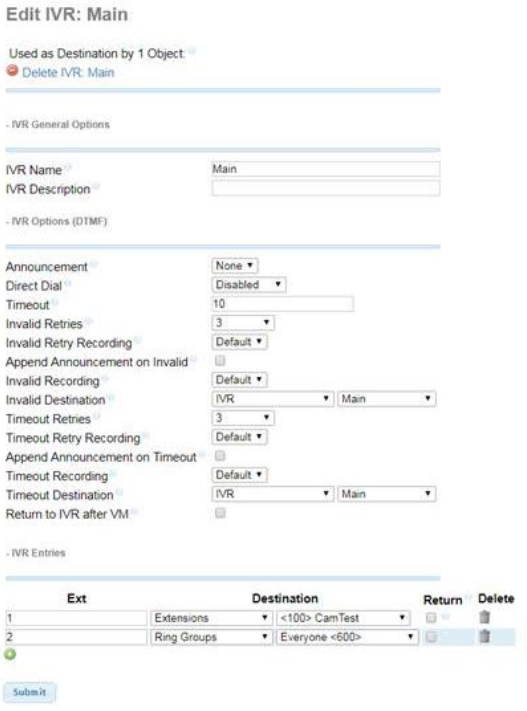
Option to "Add IVR" and a list of present IVRs are displayed at the top right side of the screen.
IVR settings are displays on the left side of the screen
Used as Destination for <#> Object: This will display showing the number of other system features that have statically configured this IVR as a destination (ring groups, inbound routes, etc). You can view a list of the specific destinations it's referencing by mousing over the light blue dot just to the right of this alert. Delete IVR: <title>: Clicking this will delete this IVR and remove it from the system.
IVR General Options
IVR Name: (Default: <blank>) Text entered here will be used as the name for this IVR and display in the list at the top right of the screen IVR Description: (Default: <blank>) Text can be entered here to display a description for this IVR.
IVR Options (DTMF)
Announcement: (Default: None) Message to be played to caller before as soon as they reach this IVR. Drop down lists all recordings from System Recordings.
Direct Dial: (Default: Disabled) Drop down displaying direct dial options for callers while in this IVR.
<directory>Company Directory: Allows callers to enter a user’s extensions provided they are listed in the chosen directory. If you have multiple directories on the system, you can chose which directory you want callers to be allowed to dial here.
Disabled: Completely disabled direct dial functionality. If the caller dial an extensions number and provided that extensions is not listed as a valid IVR entry below, it will be treated as invalid input.
Extensions: Callers can dial any extensions on the system to ring directly to them.
Timeout: (Default: 10) Number of seconds after the programmed announcement completes callers are allowed to enter an option before the IVR times out.
Invalid Retries: (Default: 3) Dropdown with options for Disabled or numbers 0 through 10. This will set the number of times the IVR will retry after the caller enters and invalid option before routing them to the programmed Invalid Destination. If Disabled is chosen, the caller will hear a message saying "Sorry you're having problems, goodbye" and then the call will terminate.
Invalid Retry Recording: (Default: Default) This is the message callers will hear after entering an invalid option. The Default message is: "We have not received a valid response. Please try again"
Append Announcement on Invalid: (Default: unchecked) If this option is checked, when a caller enters an invalid option, the above Invalid Retry Recording will play, immediately followed by the Announcement replaying again. When this option is unchecked, the caller will hear silence after the Invalid Retry Recording plays and the timeout time will restart.
Invalid Recording: (Default: Default) This is the message that will play if the caller has reached the max set number of invalid retries before sending the caller to the programmed Invalid Destination below. The Default message is "We have not received a valid response. Please wait while we connect your call.
Invalid Destination: (Default: == choose one ==) Drop down allowing you to select the destination where caller is sent if the max number of invalid retries has been reached. You must choose an option in order for the IVR to be created.
Timeout Retries: (Default: 3) Dropdown with options for Disabled or numbers 0 through 10. This will set the number of times the IVR will retry after the caller enters and invalid option before routing them to the programmed Invalid Destination. If Disabled is chosen, the caller will hear a message saying "Sorry you're having problems, goodbye" and then the call will terminate.
Timeout Retry Recording: (Default: Default) This is the message callers will hear if the timeout time has elapsed and they have not entered an option. The Default message is: "We have not received a valid response. Please try again"
Append Announcement on Timeout: (Default: unchecked) If this option is checked, when a caller enters reaches the timeout time, the above Timeout Retry Recording will play, immediately followed by the Announcement replaying again. When this option is unchecked, the caller will hear silence after the Timeout Retry Recording plays and the timeout time will restart.
Timeout Recording: (Default: Default) This is the message that will play if the caller has reached the max set number of timeout retries before sending the caller to the programmed Timeout Destination below. The Default message is "We have not received a valid response. Please wait while we connect your call."
Timeout Destination: (Default: == choose one ==) Drop down allowing you to select the destination where caller is sent if the max number of timeout retries has been reached. You must choose an option in order for the IVR to be created.
Return to IVR after VM: (Default: unchecked) If this option is checked and a caller reached a voicemail after choosing an IVR option, dialing an extension through this menu or reaching a voicemail as a result of the invalid or timeout programming, once they have left a message and press #(pound) to end, they will hear the follow message and then be sent back to this IVR. "You have exited the voicemail system and will now be transferred back to the previous menu or you may hang-up to end this call".
IVR Entries Fields:
Ext: (Default: <blank>) Here you can enter the option callers can dial. This field will accept the asterisk 
Destination: (Default: == choose one ==) Drop down allowing you to select the destination where caller is sent if they enter the programmed Ext.
Return: (Default: unchecked) When checked, this will change the function of this menu option depending on how the caller reached this IVR. If they reached this IVR from another or there was another IVR somewhere in the call path prior to this IVR, checking this box will result in the programmed destination being ignored and instead the caller will be sent back to that previous IVR when the Ext for this option is entered. If this option is checked and there are no IVR's in the call path prior to this, this checkbox will be ignored and treated as if it unchecked, resulting in the caller being directed to the programmed destination.
Delete: The Delete option displays a trashcan that when clicked, will remove that IVR entry from the list of valid entries a caller can dial.
