
Queues
Automatic Call Distribution (ACD) or call queuing provides a way for a PBX to queue incoming calls. A queue is a “stack” or “line” of calls that need to be answered. When a call is directed into the queue, by default, the calls are answered in a first-in, first-out order. Call queues are useful when you have more callers than people available to answer calls. Callers placed into a queue can hear music or advertising until someone is available to answer their call. The Queues module allows you to create and design queues that allow callers to speak with agents as quickly and painlessly as possible.
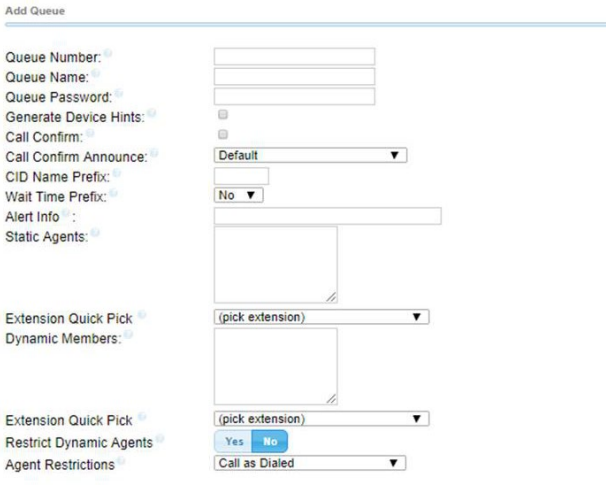
Add Queue
Queue Number: (Default: <blank>) Use this number to dial into the queue or transfer callers to this number to put them into the queue. This number can also be used in conjunction with feature codes related to agent login/logoff and BLF monitoring.
Queue Name: (Default: <blank>) Give the queue a brief name to help you identify it.
Queue Password: (Default: <blank>) Optional: You can require agents to enter a password before they can login to this queue. The password is only used when logging in with the legacy queueno * code. When using the toggle codes, you must use the “Restrict Dynamic Agents” option in conjunction with the dynamic members list to control access.
Generate Device Hints: (Default: <unchecked>) If checked, individual hints and dialplan will be generated for each SIP device that is part of the current queue. These are used in conjunction with programmable BLF phone buttons to log in and out of the queue and generate BLF status as to the current state. The format of the hints is: *45ddd*qqq where *45 is the currently defined queue toggle feature code, ddd is the extension number of the device, and qqq is the current queue’s number. When programming a button as a queue toggle button, it must be programmed as an extension speed dial in order for the BLF functionality to work.
Call Confirm: (Default: <unchecked>) If checked, queue calls to external phone numbers are forced into call confirmation mode. This includes queue calls to agents who are using external numbers, as well as to internal extensions whose call forwarding or followme settings are causing calls to route to external numbers. If call confirmation is enabled, the member must accept the call before it is answered and delivered.
Call Confirm Announce: (Default: <default>) Announcement played to the queue member announcing the queue call and requesting confirmation prior to answering. If set to default, the standard call confirmation default message will be played unless the member is reached through a Follow-Me setting that has an alternate remote announcement message set. The alternate remote announcement message will override any other message specified in the queue. You can create custom “call confirm announce” recordings in the System Recordings module.
CID Name Prefix: (Default: <blank>) Optional: You can prefix the caller ID name of callers to the queue. i.e.: If you prefix with “Sales:,” a call from John Doe would display as “Sales: John Doe” on the extensions that rings. The caller ID prefix will not show when calls are sent to external numbers from the queue. This information is passed to all SIP phones including the Bria, X-Lite, and Zoiper apps.
Wait Time Prefix: (Default: <no>) When set to Yes, the CID name and/or the caller ID name prefix will be prefixed with the total wait time in the queue so the answering agent is aware how long the caller has been waiting. It will be rounded to the nearest minute, in the form of “Mnn:” where “nn” is the number of minutes. If the call is subsequently transferred to another internal extension, the wait time will reflect the time since it first entered the queue or reset if the call is transferred to another queue with this feature set. This information is passed to all SIP phones including the Bria, X-Lite, and Zoiper apps.
Alert Info: (Default: <blank>) Optional: This can be used to force distinctive ring tones to SIP devices that are agents/extensions logged into the queue. The format for this entry is Ringx where x is the number of the ringtone to be used, i.e.: Ring4. This information is currently translated and applied by Polycom and Yealink phones only. The alert info is passed to, but not translated and applied by the Bria, X-Lite, and Zoiper apps.
Static Agents: (Default: <blank>) Static Agents are extensions that are assumed to always be in the queue. List extensions to ring, one per line. You can also list external numbers to ring as well. For both internal numbers and extensions insert a “,” after the agent followed by a penalty value.
Dynamic Members: (Default: <blank>) Dynamic members are extensions that can log in and out of the queue. When a member logs into the queue, their penalty will be specified here. Extensions listed here will not automatically be logged into the queue. Extension Quick Pick: (Default: <pick extension>) Choose an extension from the drop down list to add to the list above.
Penalties: (Default: <0>) Asterisk tries to call the lowest-numbered penalty group first. Only if nobody in that group is able to take a call does the system escalate to calling the next group. Any agent logged into the queue who is not paused or on a call is considered available to take a call. This means if you have one agent who has stepped away from their phone and they are in penalty group 1, the queue will never move on to calling a higher penalty group until that agent either is logged out, paused, or on a call, or until the queue's minimum penalty is changed to be greater than that agent's penalty.
One way to get around this is to enable auto-pause in the queue page in the PBX GUI. This will automatically pause agents when they miss a call, until they un-pause themselves. When paused, the agent will not be considered available. The queue pause toggle is *46 and is enabled by default in the Axion HIVE GUI.
Restrict Dynamic Agents: (Default: <no>) If set to Yes, only the dynamic members listed in the Dynamic Members tab will be able to log into the queue. No one else would be allowed to log in as a dynamic member.
Agent Restrictions: (Default: <call as dialed>)
- Call as Dialed: The queue will call an extension just as if the queue were another user. Any Follow-Me or call forward states active on the extension will result in the queue call following these call paths.
- No Follow-Me or Call Forward: Follow-Me and call forward settings on internal extensions will be ignored. Any other agent will be called as dialed. This behavior is similar to how extensions are dialed in ring groups.
- Extensions Only: Same as the no follow-me or call forward mode above, EXCEPT any other number entered for an agent that is NOT a valid extension will be ignored. No error checking is provided when entering a static agent or when logging in as a dynamic agent. The call will simply be blocked when the queue tries to call it.
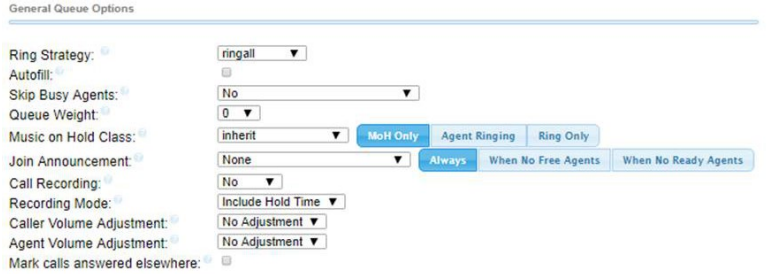
General Queue Options
Ring Strategy: (Default: <ringall>)
- ringall: Ring all available agents until someone answers (default). If using penalties, all agents will start with a penalty of 0 for the defined ring time as defined in the “Agent Timeout” setting below. Then all agents with a 1,2,3 and so forth.
- leastrecent: Ring agent who was least recently called by this queue only, and repeatedly.
- fewestcalls: Ring the agent with the fewest answered and completed calls from this queue.
- random: Ring random agent.
- rrmemory: Round robin with memory (remember where we left off last ring pass).
- rrordered: Same as rrmemory, except the queue member order from config file is preserved.
- linear: Rings agents in the order specified for static agents, and for dynamic agents in the order that they had logged in.
- wrandom: Random, using the member’s penalty as a weighting factor.
- Autofill: If this is set to Yes, and multiple agents are available, the PBX will send one call to each waiting agent (depending on the ring strategy). Otherwise, it will hold all calls while it tries to find an agent for the top call in the queue, making all other callers wait.
Skip Busy Agents: (Default: <no>)
- No: The queue will call agents even if they are on an occupied phone.
- Yes: Agents who are on an occupied phone will be skipped as if the line were returning busy. This means that call waiting or multi-line phones will not be presented with the call.
- Yes + (ringinuse=no): The queue configuration flag “ringinuse-no” is set for this queue in addition to the phone’s device status being monitored. This results in the queue tracking remote agents (agents who are a remote PSTN phone, called through Follow-Me and other means) as well as PBX connected agents. So, the queue will not attempt to send another call if they are already on a call from any queue. If the remote agent is on a call that is not from a queue, the call will be sent to the remote agent.
- Queue calls only (ringinuse=no): The queue configuration flag “ringinuse=no” is set for this queue, but the device status of locally connected agents is not monitored. The behavior is to limit an agent belonging to one or more queues to a single queue call. If they are occupied with other calls, such as outbound calls they initiated, the queue will consider them available and ring them, since the device state is not monitored with this option.
WARNING: When using a setting that sets the “ringinuse=no” flag, there is a NEGATIVE side effect. An agent who transfers a queue call will remain unavailable to any queue until that call is terminated, as the call still appears as “inuse” to the queue UNLESS “Agent Restrictions” is set to “Extensions Only.”
Queue Weight: (Default: <0>) Gives queues a “weight” (priority level). The higher the weight, the higher the priority. (Default = 0) If there are agents common to multiple queues, the queue with the highest priority will deliver its calls first.
Music on Hold Class: (Default: <inherit>) The Music on Hold (MoH) played to the caller while they wait in line for an available agent. Select an option from the drop-down menu. Choose “inherit” if you want the MoH class to be what is currently selected, such as by the inbound route.
To the right of the Music On Hold Class drop-down menu, select one of these three options: (Default: <MoH Only>)
- MoH Only: Play music until the agent answers.
- Agent Ringing: Play MoH until an agent’s phone is presented with the call, then play ringing. If the agent doesn't answer, MoH will return.
- Ring Only: Makes callers hear a ringing tone instead of MoH, ignoring any MoH class selected as well as any configured periodic announcements.
Join Announcement: (Default: <none>) The announcement played to callers before they join the queue. This can be skipped if there are agents ready to answer a call (meaning they still may be wrapping up from a previous call) or when they are free to answer the call right now. You can add additional recordings in the System Recordings module.
To the right of the Join Announcement drop-down menu, select one of these three options: (Default: <Always>)
- Always: Always play the announcement to callers.
- When No Free Agents: Play the announcement to callers when no agents are free to answer the call right now. A "free" agent is off the phone but might be completing their "wrap-up" time, so they might not be available to answer the call immediately. This announcement could be something like “Your call will be answered by the next available representative”.
- When No Ready Agents: Play the announcement to callers when there are no ready agents. A "ready" agent is someone who is both "free" (off the phone) and has completed their wrap-up time (if any is set) after a previous call, so they are theoretically available to answer the call immediately.
Call Recording: (Default: <no>) Choose whether to record calls to this queue, and which format that you wish to use to record the calls.
Recording Mode: (Default: <include hold time>) Choose whether or not to include hold time in the recording so the recording starts as soon as the caller enters the queue, or to begin recording after the call is answered by an agent in the queue.
Caller Volume Adjustment: (Default: <no adjustment>) Adjust the recording volume of the external caller.
Agent Volume Adjust: (Default: <no adjustment>) Adjust the recording volume of the queue member.
Mark calls answered elsewhere: (Default: <unchecked>) If set to Yes, all calls are marked as "answered elsewhere" when cancelled. The effect is that missed queue calls are *not* shown on the phone as missed calls (if the phone supports it).
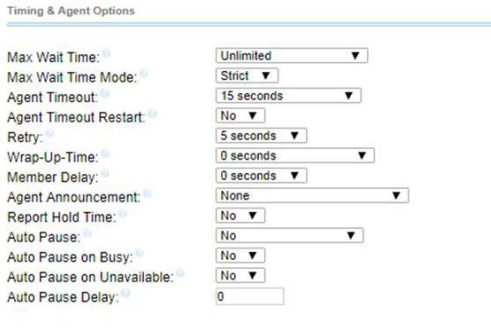
Timing and Agent Options
Max Wait Time: (Default: <unlimited>) Defines the maximum number of seconds a caller can wait in a queue before being pulled out and sent to the fail over destination . (Default = unlimited) Choose the max wait time from the drop down menu.
Max Wait Time Mode: (Default: <strict>) Set the PBX timeout priority:
- Strict: When the “Max Wait Time” of a caller is hit, they will be pulled out of the queue immediately.
- Loose: If a queue member is currently ringing with this call, then the PBX will wait until the current cycle of ringing (set at Agent Timeout) stops or the call is rejected before taking the caller out of the queue. This means that the “Max Wait Time” could be as long as “Max Wait Time” + “Agent Timeout” combined.
Agent Timeout: (Default: <15 seconds>) The number of seconds an agent’s phone can ring before we consider it a timeout.
Unlimited or other timeout values are limited by system ring time or individual extension ring time settings.
Agent Timeout Restart: (Default: <no>) If set to Yes, then the timeout for an agent to answer is reset if a BUSY or CONGESTION is received. This can be useful if agents are able to cancel a call with reject or similar.
Retry: (Default: <5 seconds>) The number of seconds to wait before trying all the phones again. Choosing No Retry will send the caller to the failover destination as soon as the first attempted agent times-out. No other agents will be attempted.
Wrap-Up-Time: (Default: <0 seconds>) This is how many seconds to wait after a successful call before sending another call to a potentially free agent (default is 0, or no delay). If using Asterisk 1.6+, you can also set the “Honor Wrapup Time” across queues on the Advanced Settings page so that this is honored across queues for members logged on to multiple queues.
Member Delay: (Default: <0 seconds>) If you wish to have a delay before the member is connected to the caller, or before the member hears any announcement message), set this to the number of seconds to delay.
Agent Announcement: (Default: <none>) Announcement played to the agent prior to bridging in the caller.
Report Hold Time: (Default: <no>) If set to Yes, the caller's hold time will be reported to the agent before the caller is connected to the agent.
Auto Pause: (Default: <no>) Whether to auto pause an agent in this queue (or all queues they are a member of) if they don't answer a call. Specific behavior can be modified by the Auto Pause Delay as well as Auto Pause Busy/Unavailable settings if supported on this version of Asterisk. Options are Yes, in this queue only, Yes in all queues, and No. When the agent is paused they must dial *46 to unpause themselves.
Auto Pause on Busy: (Default: <no>) On the Axion system, this is basically skip busy agents. After the agent hangs up, the agent will be rung on the very next ring pass.
Auto Pause on Unavailable: (Default: <no>) This appears to do nothing on the Axion system. Documentation states that it is not active on all versions of Asterisk.
Auto Pause Delay: (Default: <0>) This appears to do nothing on the Axion system. Documentation states that it is not active on all versions of Asterisk.
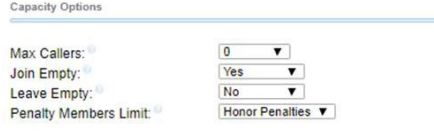
Capacity Options
Max Callers: (Default: <0>) Define the maximum number of callers who can be waiting in the queue at the same time (0 for unlimited). If not set to 0, and the maximum capacity is reached, additional calls would be sent to the failover destination at the bottom of the page.
Join Empty: (Default: <yes>) Determines if new callers will be admitted to the queue. If not, the fail over destination will be immediately pursued.
The options include:
- Yes: Always allows the caller to join the queue, even if all agents are paused.
- Strict: Same as “Yes,” but more strict. Simply speaking, if no agent could answer the phone, then the caller will not enter the queue. If agents are in use or ringing someone else, the caller will still be admitted.
- Ultra Strict: Same as “Strict” plus a queue member must be able to answer the phone NOW. Simply speaking, available agents who could answer but are currently on the phone or ringing on behalf of another caller will be considered unavailable.
- No: Callers will not be admitted if all agents are paused, show an invalid state for their device or have penalty values less than “QUEUE_MAX_PENALTY” (not currently set in PBX dialplan).
- Loose: Same as “NO,” except callers will be admitted if there are paused agents who could become available.
Leave Empty: (Default: <no>) Determines if callers should be exited prematurely from the queue in situations where it appears no one is currently available to take the call.
The options include:
- Yes: Callers will exit if all agents are paused, show an invalid state for their device or have penalty values less than “QUE_MAX PENALTY” (not currently set in PBX Dialplan).
- Strict: Same as “Yes,” but more strict. Simply speaking, if no agent could answer the phone, the caller is sent to the failover destination. If agents are in use or ringing someone else, the caller will still be held in the queue.
- Ultra Strict: Same as “Strict” plus a queue member must be able to answer the phone NOW to let them remain. Simply speaking, any available agents that could answer but are currently on the phone or ringing on behalf of another caller will be considered unavailable. The caller is then sent to the failover destination.
- Loose: Same as “Yes,” except callers will remain in the queue if there are paused agents who could become available.
- No: Never have a caller leave the queue until the “Max Wait Time” has expired.
Penalty Members Limit: (Default: <honor penalties>) A limit can be set to disregard penalty settings, allowing all members to be tried, when the queue has too few members. No penalty will be weighed in if there are only X or fewer queue members. If this is set to three and there are three agents logged in, when one agent logs off, penalties are ignored.
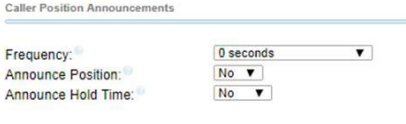
Caller Position Announcements
Frequency: (Default: <0 seconds>) Define how often to announce queue position and estimated hold time (0 to disable announcements).
Announce Position: (Default: <no>) If set to Yes, the system will announce the caller's position in the queue to the caller. For example, "You are number three..."
Announce Hold Time: (Default: <no>) Yes/No/Once: Whether the system will include the estimated hold time in position announcements. Hold time will not be announced if less than one minute.
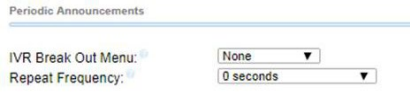
Periodic Announcements
IVR Break Out Menu: (Default: <none>) You can optionally present an existing IVR as a “Break Out” menu. This IVR must only contain single-digit “dialed options.” The recording set for the IVR will be played at intervals specified in “Repeat Frequency” below. The announcement for the selected IVR must be a system recording comprised of a single sound file. IVRs that have announcements composed of compound recording files will not be presented as selections for this field.
Repeat Frequency: (Default: <0 seconds>) How often to announce a voice menu to the caller (0 to disable announcements).
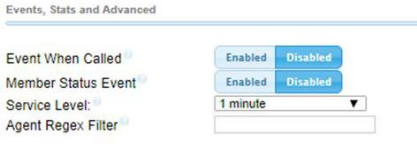
Events, Stats, and Advanced
Event When Called: (Default: <disabled>) When this option is set to yes, the following manager events will be generated:
AgentCalled, AgentDump, AgentConnect, and AgentComplete.
Member Status Event: (Default: <disabled>) When set to yes, the following manager event will be generated: QueueMemberStatus. Service Level: (Default: <1 minute>) This is used for service level statistics. The system checks the time set here to return whether the calls were answered within the service level time frame?
Agent Regex Filter: (Default: <blank>) Provides an optional regex expression that will be applied against the agent callback number. If the callback number does not pass the regex filter, it will be treated as invalid. This can be used to restrict agents to extensions within a range, to prevent callbacks from including keys like *, or for any other use that may be appropriate.
examples:
^([2-4][0-9]{3})$
This would restrict agents to extensions 2000-4999.
^([0-9]+)$
This would allow any number of any length, but restrict the * key.
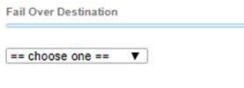
Fail Over Destination
(Default: <choose one>)
Important: Set a failover destination here by choosing a valid destination from the drop-down menus. The caller would be sent to this destination if they exit the queue for reasons such as maximum wait time, queue capacity, or join empty/leave empty settings.
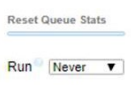
Reset Queue Stats
Run: (Default: <never>) Select how often to reset queue statistics. If you rest your cursor over the question mark after “Run”, you will be presented with a breakdown of each of the schedule settings.