Web Portal: Audit Trail (Were my Messages Sent?)
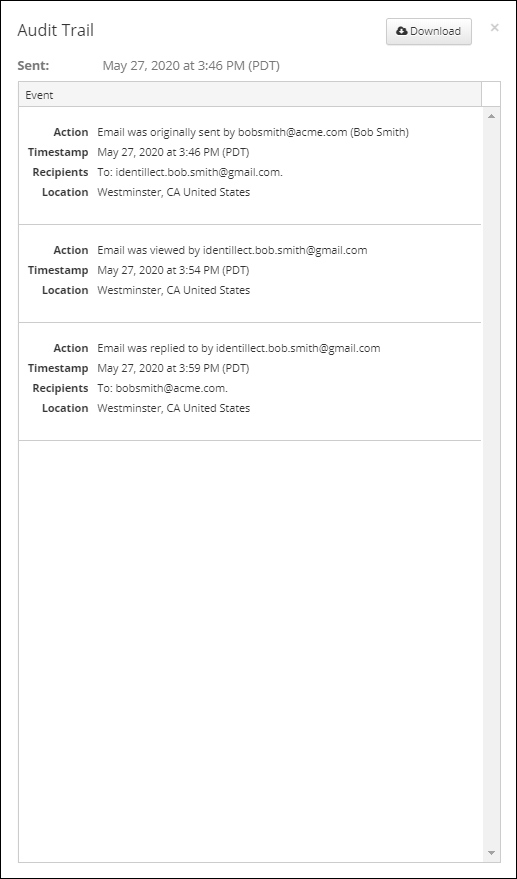
The Audit Trail contains complete details regarding any activity that pertains to the email (ie. if the email was viewed, replied to, forwarded, opened or attachments downloaded). Each activity will show the name of the recipient that completed the action along with the date, time and general location based on IP address.
Instructions
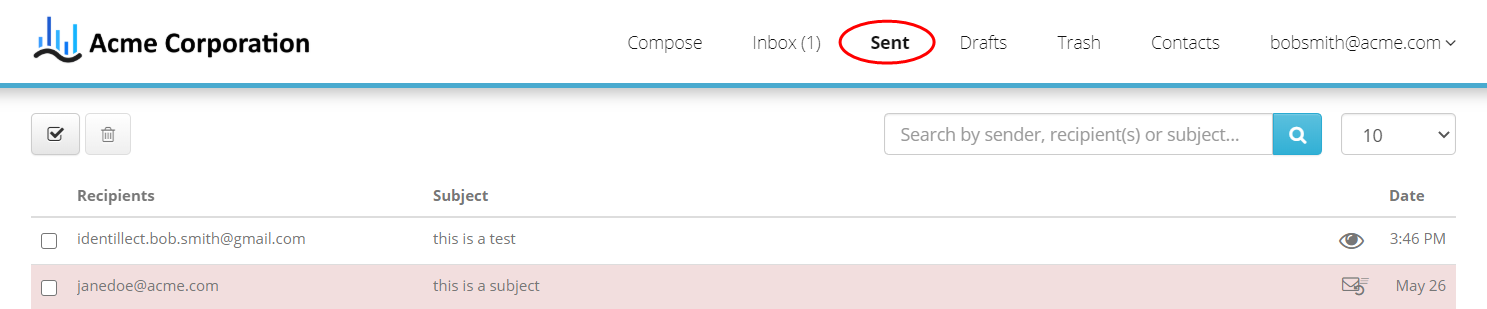
1. Click on the Sent messages folder found at the top of the screen.
2. Locate the email in question.
*If email is highlighted in pink, then email was not delivered.

|
Icon |
Meaning |
|
|
This message has been viewed. By clicking this you can view the Audit Trail. |
|
|
This message has an attachment. |
|
|
This message has been retracted. |


3. If you want to see a detailed list of the audit trail you can access it by clicking on the eyeball icon at the end of the row. This will bring up the Audit Trail popup. This information can also be downloaded by clicking on the Download button.
*When viewing the email, you can also access the Audit Trail by clicking on the