
See when Identillect staff viewed the portal as one of your users
When you ask Identillect for help, our support staff may need to see the web portal the way one of your users sees it. They do this with View as user, a tool only Identillect staff can use. Every session is recorded in your organization's Access log, which business administrators can review at any time.
Staff can only view as someone who has Remote support turned on in their profile. It's off unless that person turned it on (or signed up your organization), and only they can change it. See Manage your profile and account. If support asks to look at a problem in someone's account, ask that person to turn remote support on.
Note: Business administrators can't view the portal as another user. To help someone on your team, use the Users tab to change their settings, role or add-ons. See Invite and manage users.
What Identillect staff can and can't do while viewing
- They see the person's mailbox, folders, labels, contacts and settings, and can make changes for them, such as fixing a setting.
- They can't send mail as the person: compose, reply, forward and send again are turned off. They also can't change billing, such as the card on file.
- Opening a message while viewing doesn't mark it as read for the person.
- Everything is logged: who viewed, whose portal, when the session started and ended, every message opened, and every change made.
- If the person turns remote support off, the session ends right away.
Review the access log
- Click your name or initials in the top-right corner, click Organization, then open Reports & Analytics.
- Click Access log in the top-right corner of the page.
-
To narrow the list, choose an Action: View-as started, View-as ended, Message opened while viewing as or Change made while viewing as.
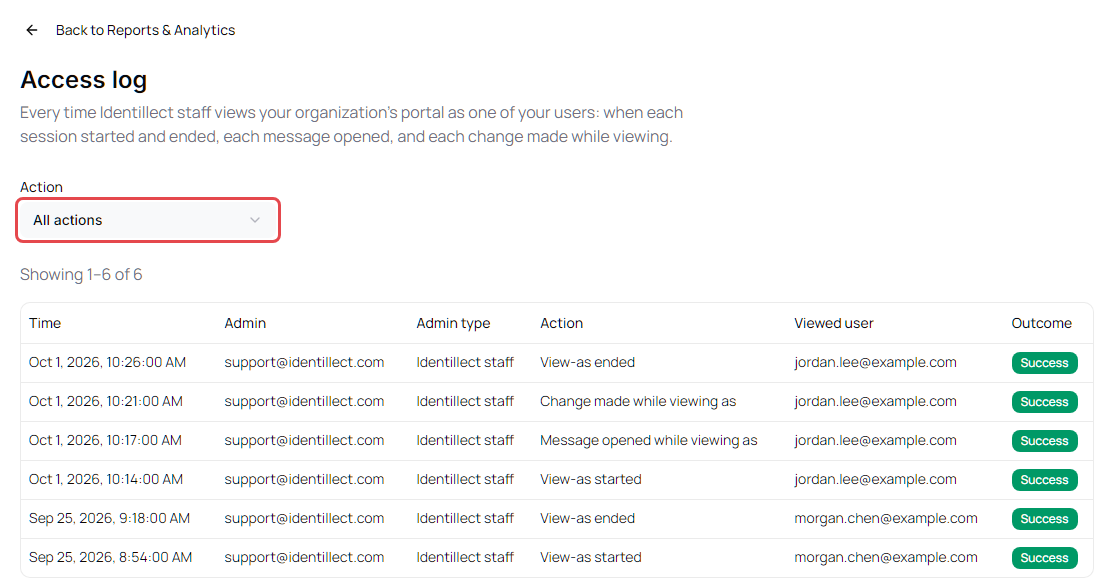
| Column | Shows |
|---|---|
| Time | When it happened |
| Admin | The email of the person who viewed |
| Admin type | Who viewed: Identillect staff (entries from before October 2026 may show Business admin) |
| Action | What happened |
| Viewed user | Whose portal was viewed |
| Outcome | Whether the action succeeded |
Click Back to Reports & Analytics to return.
If you see a session you didn't expect, contact Identillect support.