
View a message's audit trail
The audit trail shows what happened to a secure message after you sent it: when it was sent, when each recipient opened it and from where, and whether they replied or downloaded files. You can print it for your records. Audit trails are available for messages you sent.
Open the audit trail
- Open the message in your Sent folder.
- Click More actions (⋮) in the top-right corner of the message, then click Audit Trail. In a conversation, you can also click View Audit Trail below any message you sent. For a conversation, the audit trail combines the activity of every message in it.
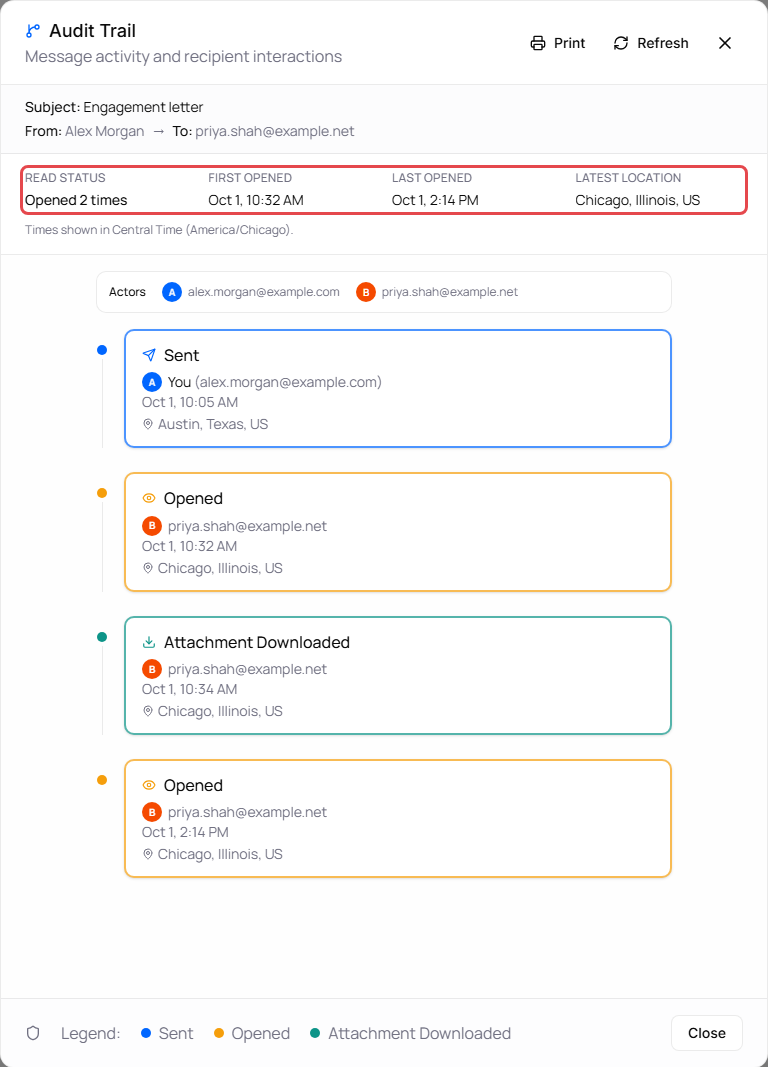
What the audit trail shows
At the top, a summary:
| Item | Meaning |
|---|---|
| Read status | Not yet opened, or how many times the message was opened. |
| First opened / Last opened | When the message was first and most recently opened. |
| Latest location | Where the most recent activity came from, based on the internet address used. |
Below the summary is a timeline, oldest first. Each event shows who did it (You for your own actions), the date and time, and the location when it's known. A colored dot marks the type of event; the Legend at the bottom lists the colors.
| Event | Meaning |
|---|---|
| Sent | You sent the message. |
| Delivery failed | The notification email couldn't be delivered. See Notification emails that couldn't be delivered. |
| Opened | A recipient opened the message. Several opens in a row are grouped, for example Opened 3×. Click the group to see each one. |
| Replied | A recipient replied. |
| Attachment Downloaded | A recipient downloaded a copy. |
Other activity, such as sending the notification again, changing security policies, or retracting and reinstating the message, also appears in the timeline under its own name.
When several people appear in the timeline, each gets a colored letter, and the Actors list at the top of the timeline shows who each letter is.
Times are shown in your time zone; the summary says which one.
Refresh or print
- Click Refresh to load the latest activity.
- Click Print to print the full audit trail or save it as a PDF from your browser's print window.